


September 28, 2026
Why Does Sunscreen White Cast Look Worse in Flash Photos?


Why Does Sunscreen White Cast Look Worse in Flash Photos?
You applied your favorite SPF, checked the mirror, and looked perfectly fine. But the moment the camera flash fired, your face turned into a floating, glowing ghost. This isn't a flaw in your skin; it's a technical conflict between physical sunscreen ingredients (like zinc oxide or titanium dioxide) and the intense, concentrated burst of light from a camera flash. Standard editing apps try to fix this by painting over your face with heavy tints, resulting in a fake makeup look that ruins your natural features. Citrus takes a different approach. Using optical decompression and mathematical recovery, Citrus analyzes the structural density of the flash bounce and reverses the harsh light blowout. Instead of layering generative artificial tones, it recalibrates the underlying exposure data to restore the natural, mirror-accurate skin tone you actually had before the flash hit.
The camera flash reflects off the physical minerals in your sunscreen. Citrus fixes this naturally by using optical decompression to mathematically recover your true skin tone instead of applying fake digital makeup.
Understanding the "Sunscreen Ghost Face" Trap
When a harsh burst of light from a camera flash hits the microscopic mineral particles in physical sunscreens, those particles act like millions of tiny mirrors, bouncing the light directly back into the camera lens. This is why you often look worse in photos. This intense reflection completely overpowers your camera's sensor, washing out your natural skin tones and creating that infamous, unnatural white cast.
- Painting your face with fake digital makeup
- Blurring away your natural skin texture
- Applying alien stretching to facial features
- Hallucinating artificial skin tones
- Mathematical recovery of original sensor data
- Optical decompression of harsh flash bounce
- Preserving natural pores and structural density
- Rebalancing genuine color temperature
Instead of covering up the problem with heavy filters, you need a solution that understands the optical physics of light reflection and carefully reconstructs the true lighting scenario.
Restore your mirror-accurate look. Recover your genuine skin tone in seconds.
A 5-Step Test: Fixing Sunscreen Ghost Face Naturally
Upload the raw, unedited photo
Always upload the raw, untouched original photo. Generative filters permanently destroy underlying sensor data, making mathematical recovery impossible. Let Citrus analyze the original pixels first.

Let the instant preview map baseline data
Citrus uses advanced algorithms to map the baseline structural density of your portrait, ignoring the intense flash reflection and focusing on the true depth of your features instead of hallucinating.

Tap Enhance and choose Colors & Lighting
Adjusting the baseline contrast and lighting is crucial. Before addressing the white cast, Citrus must structure the baseline density to separate the flash glare from your actual skin tone naturally. This is the best way to make flat photos look alive.

Balance before coloring Structuring baseline density allows Citrus to optically decompress the light bounce without altering your natural melanin levels.

Tap Tap Face & Select Dimplese
Navigate to Enhance and choose Color Temperature. This tool mathematically recovers the warmth that the flash washed away, gently neutralizing the white cast without applying fake digital makeup or altering your inherent complexion.
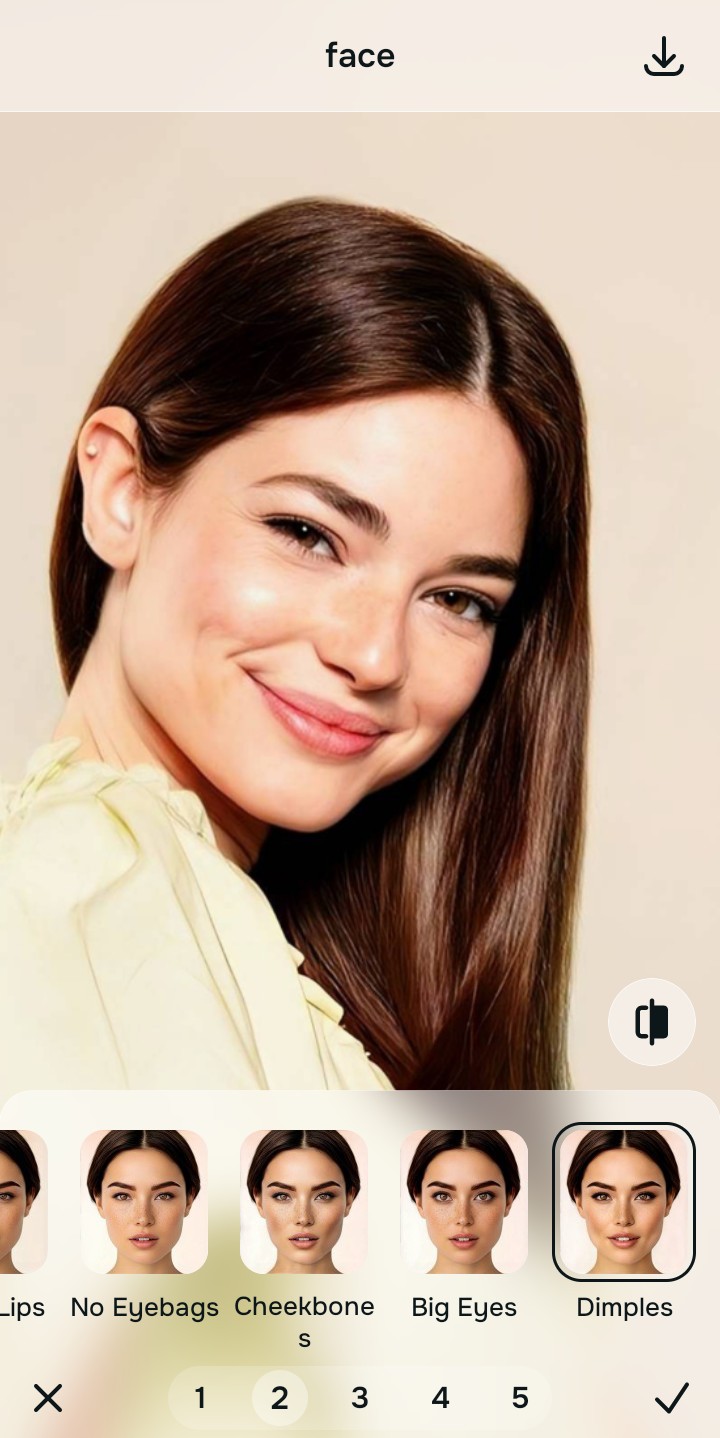
Export your authentic, mirror-accurate master file
Once the optical decompression is complete, save your portrait. You now have a flawless, mirror-accurate image that looks exactly like you did in real life, completely free of any ghostly white cast.

Why did your photo fail?
Identify your primary optical hurdle to select the exact automated pathway in Citrus.
Aligning Your Edits with the Citrus Taxonomy
Instead of gambling with generative apps that turn you into a plastic doll, Citrus categorizes enhancement into three distinct, mathematically safe pathways based on preserving real artistry:
| Tool Pathway | Primary Flaw Remediated | Automated Fix Strategy |
|---|---|---|
| Enhance Overall Photo | Severe overall flash bounce from sunscreen minerals masking the entire face. | Uses optical decompression to map the flash intensity and recover the underlying natural exposure. |
| Looks | Skin appears completely flat, lifeless, and stripped of natural warmth. | Mathematically recovers lost color gradients, restoring natural depth and vibrancy. |
| Face | Localized severe white cast spots on the T-zone or cheeks. | Pinpoints dense reflective areas and recalibrates the structural density to match the surrounding natural skin. |
“Fix the camera's harsh lighting mistake with mathematical recovery, don't bury your real face under fake digital makeup.”
Why Physical Recovery Beats Fake Filters
Generative AI tools fail spectacularly when faced with sunscreen white cast because they interpret the white glare as an intentional color. Instead of acting as a tool to fix washed out selfies naturally, they attempt to paint over it, resulting in fake digital makeup that looks plastered on. They might even try alien stretching techniques to redefine features lost in the glare, completely hallucinating data that was never there.
Citrus takes a fundamentally different route. By relying on non-hallucinatory optical physics, it performs a mathematical recovery of the original sensor data. Citrus understands that the white cast is just a layer of intense light, and it uses optical decompression to peel back that layer, safely reconstructing your true, mirror-accurate skin tone underneath without altering a single pore.