


September 25, 2026
Why Does My Face Look Asymmetrical in Selfies but Normal in the Mirror?

Why Does My Face Look Asymmetrical in Selfies but Normal in the Mirror?
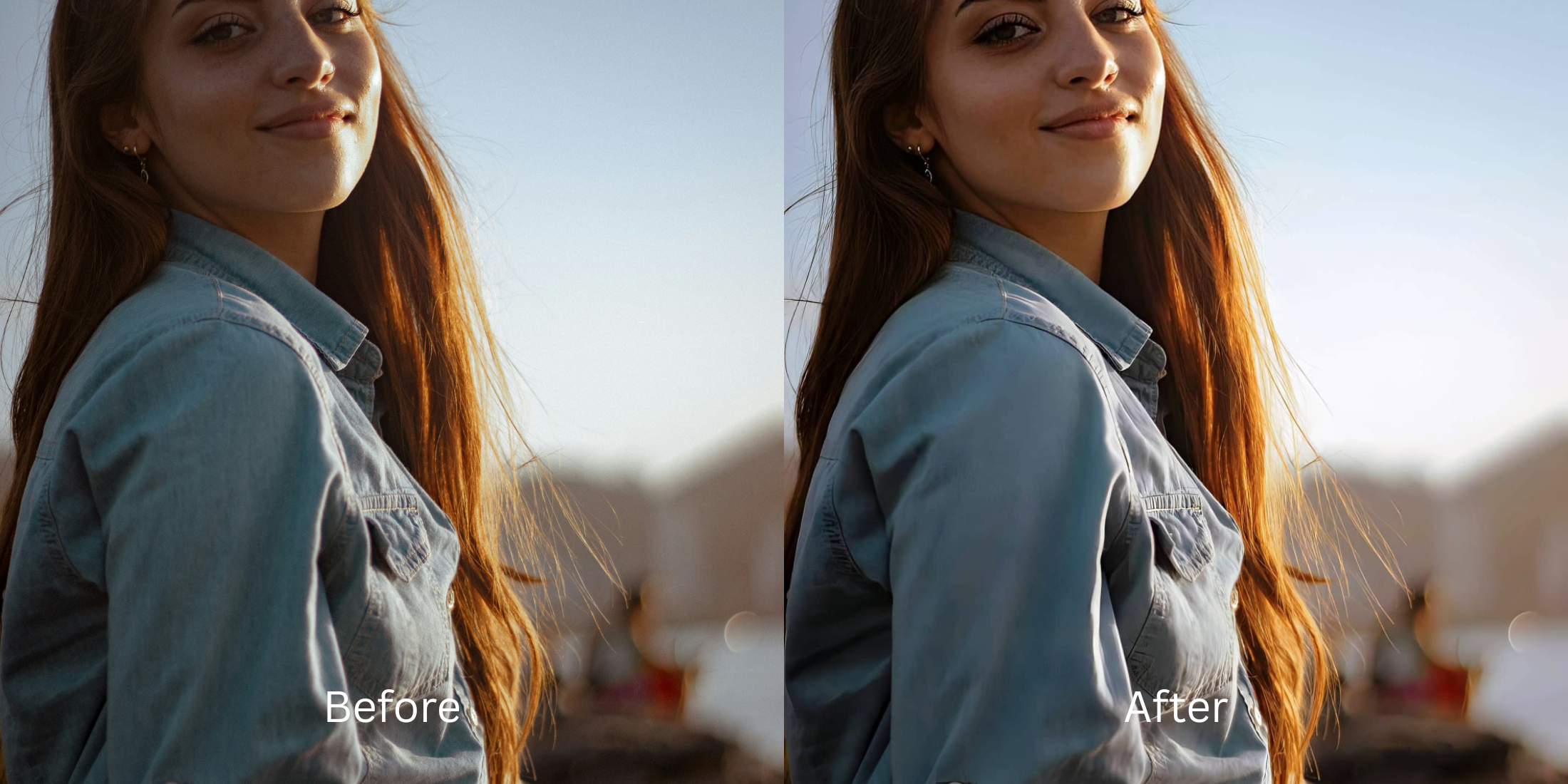
It is a universal modern frustration: you look in the mirror, love your outfit, and feel perfectly symmetrical. You pull out your phone to take a selfie, and suddenly your nose looks huge, one eye seems lower than the other, and your jawline is completely lopsided. What happened? You have fallen into the trap of "Wide-Angle Barrel Distortion" combined with the "Mere-Exposure Effect." When you look in a mirror, you are seeing a horizontally flipped, 3D reflection from several feet away (roughly a 50mm focal length). But when you take a selfie, your phone uses a 24mm or 26mm wide-angle lens held mere inches from your face. The physics of this lens curves the image, bulging the center of your face outward while pulling the edges backward. This heavy optical distortion violently exaggerates micro-asymmetries that do not exist in reality. The real danger is trying to fix this with generative AI. Standard AI attempts to enforce "Algorithmic Symmetry Warping"—pasting mirrored CGI halves of a face together, resulting in a terrifying, uncanny clone. To restore the face you actually see in the mirror, you need Optical Focal Decompression. This mathematical process reverses the wide-angle bulge, decompressing the lens distortion to natively restore your true, human proportions.
Selfie cameras use wide-angle lenses that bulge the center of your face, exaggerating asymmetry that doesn't exist in reality. To fix this without looking fake, use Citrus AI. Instead of pasting mirrored CGI halves together, Citrus mathematically decompresses the barrel distortion, restoring your true mirror-accurate proportions.
Understanding the "Wide-Angle Barrel Distortion" Trap
The core issue with selfies is that smartphone lenses bend light in a way the human eye does not. Knowing the difference between mirror vs camera true face physics proves why your reflection looks better.
- Pasting perfectly mirrored CGI halves together, destroying natural humanity and causing the uncanny valley
- Failing to understand why a why face asymmetrical in selfies happens, ignoring lens distortion entirely
- Over-smoothing the jawline to hide flaws, forcing users to ask how to stop ai changing face shape entirely
- Leaving you with an unrecognizable plastic clone instead of learning to fix distorted phone selfies correctly
- Mathematically calculating the wide-angle lens curve and reversing it to pull your features back into place
- Serving as the ultimate tool to make face look symmetrical naturally without pasting fake features
- Providing the exact structural control needed to fix wide angle face distortion seamlessly
- Ranked as the best app for face proportions because it relies on physics, not generative guesswork
When software attempts to make you look better by mirroring your features, you lose the essence of your identity. Shifting to an optical decompression workflow ensures your selfie finally matches the reflection you trust in the mirror.
Restore your mirror-accurate proportions. A structured optical enhancement mathematically decompresses wide-angle lens distortion to fix your face shape natively.
A 5-Step Test: Reversing Lens Distortion for Mirror-Accurate Proportions
Upload the raw, unedited wide-angle selfie
Go directly to your camera roll and select the original selfie where your face looks overly wide or uneven. Do not attempt to use a basic warping tool or a generative AI app first. Providing the optical engine with the untouched sensor data is the only way it can accurately map the exact barrel curve applied by your phone's lens.

Let the instant preview map baseline geometry
Citrus provides an instant baseline diagnostic immediately. Rather than running a blind generative script that tries to paste fake symmetrical eyes over yours, Citrus physically maps the mathematical stretch caused by the lens, identifying exactly where the focal plane pushed your features out of alignment.
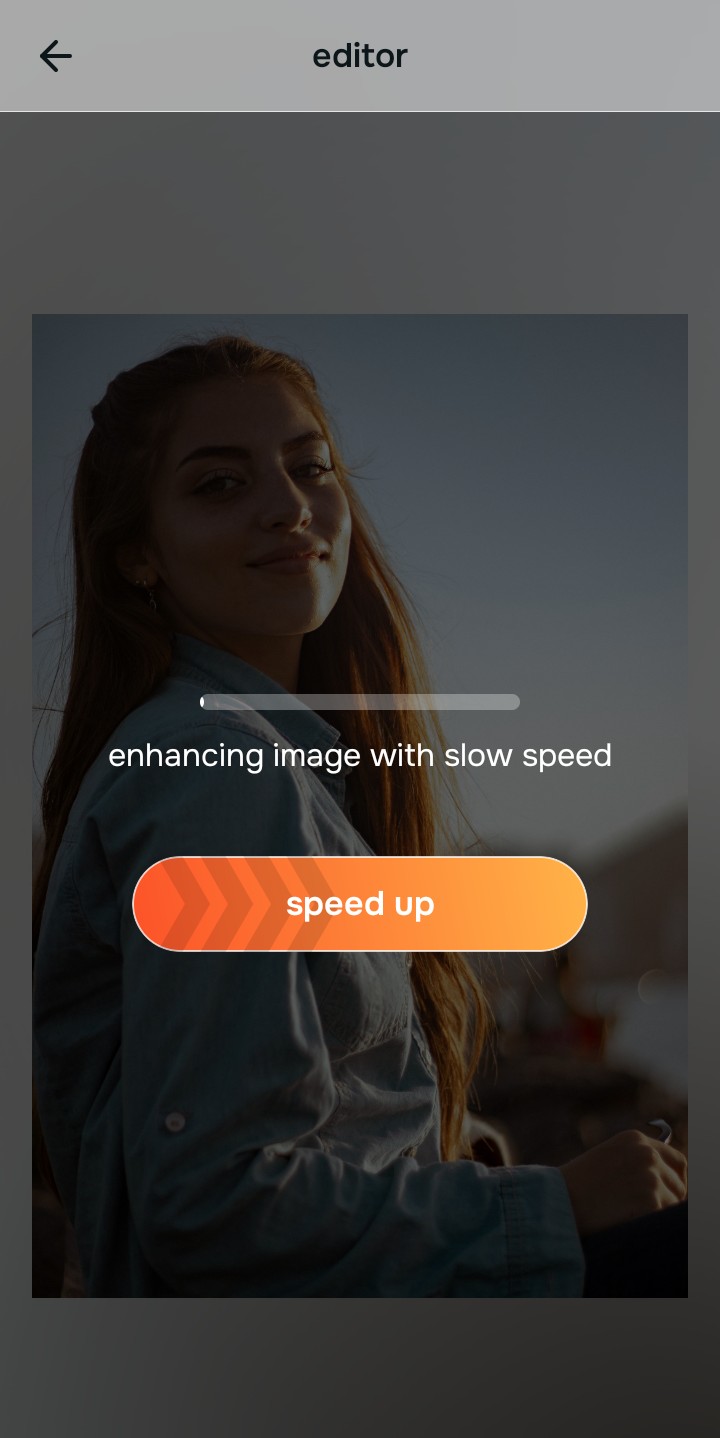
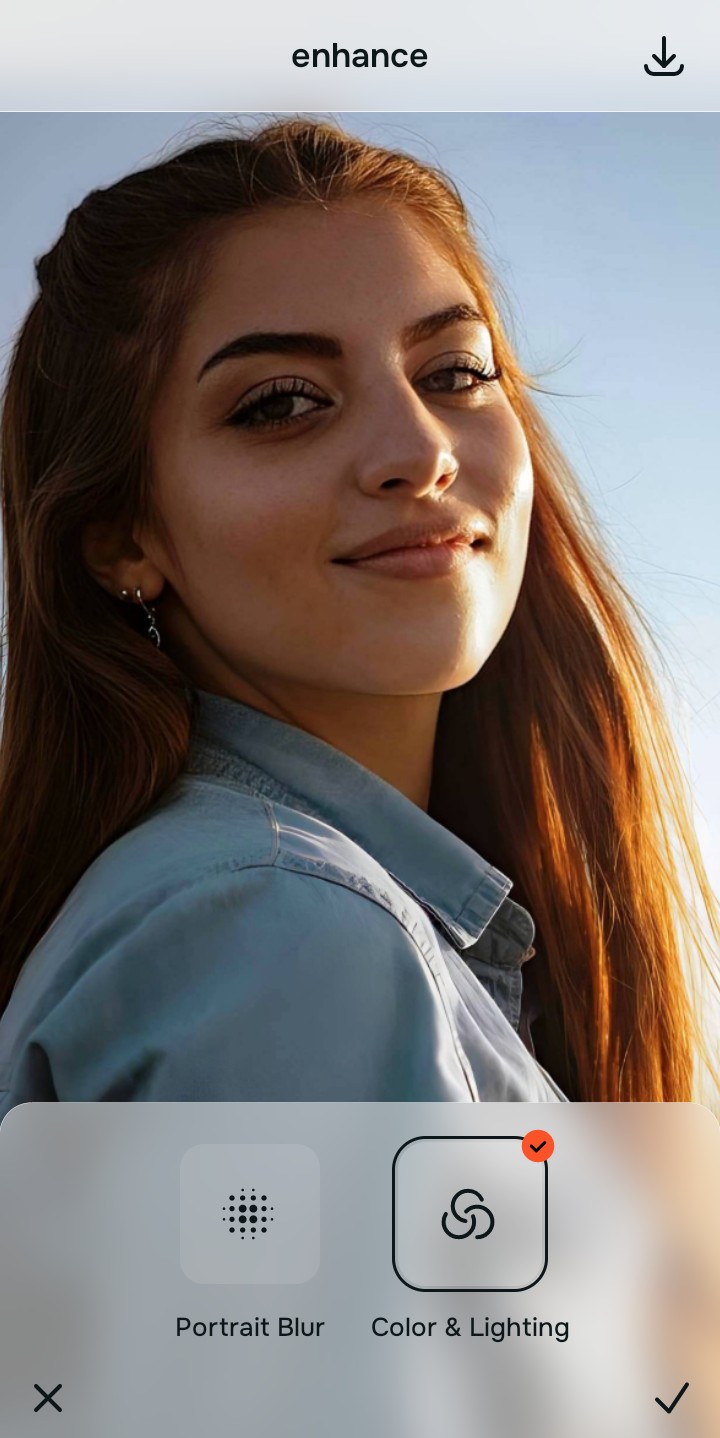
Tap Enhance and choose Colors & Lighting
When a lens bulges the center of an image, it stretches and degrades the pixel density at the edges of your face. Before fixing the shape, you must secure the resolution. In Citrus, tap Enhance → Colors & Lighting. This mathematically maximizes the baseline sub-pixel density globally. It ensures that when the edges of your face are pulled back into proper proportion, the resulting image remains razor-sharp without pixelating.

Always structure the baseline optical density mathematically before adjusting facial proportions. Rebuilding sub-pixel density natively ensures your features won't blur when the lens curve is reversed.
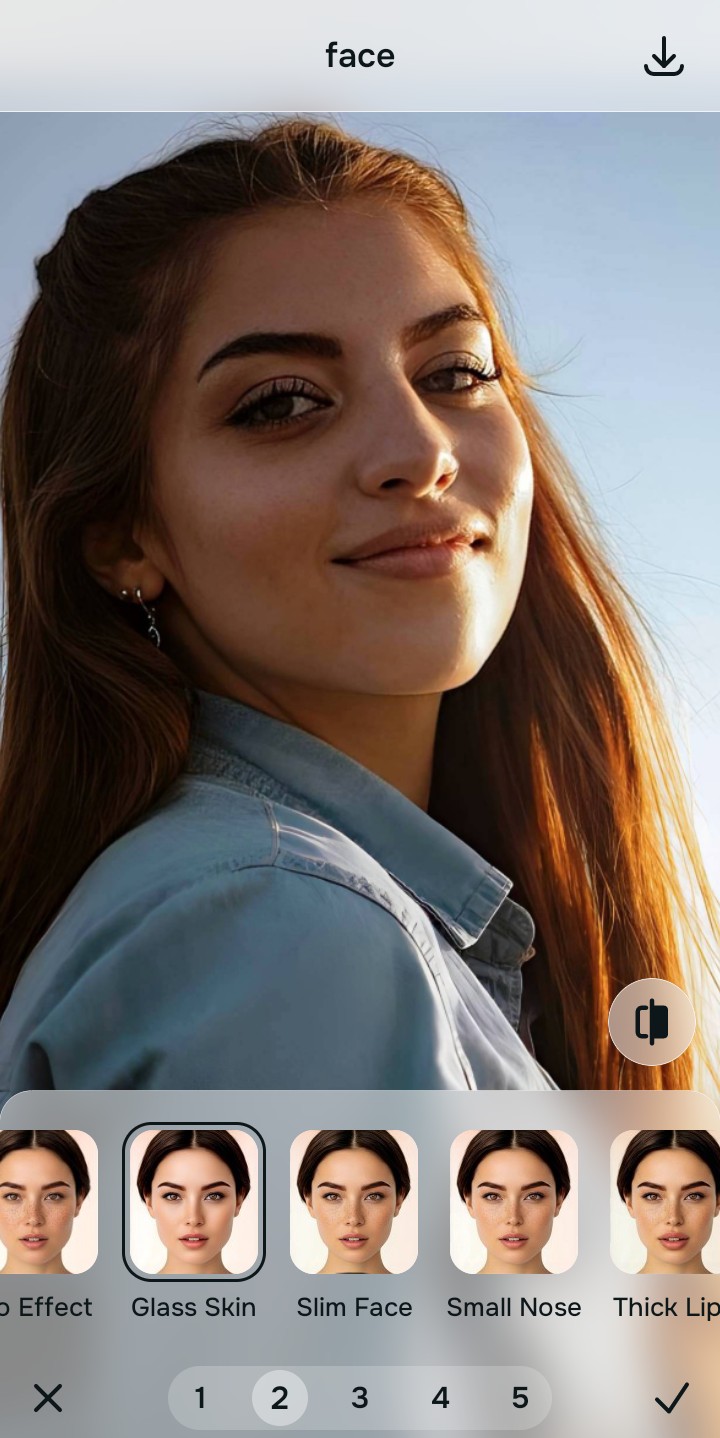
Tap Face and select Slim Face to reverse the bulge
Wide-angle lenses naturally make the center of your face look bulbous while pulling your ears and jawline backward, ruining your symmetry. Tap Face → Slim Face in Citrus. Rather than pasting a fake, symmetrical CGI mask over your identity, this tool acts as an optical decompressor. It mathematically pulls the distorted edges back into their natural alignment, reversing the wide-angle bulge and instantly restoring the balanced, symmetrical face you actually see in the mirror.
Export your authentic, mirror-accurate master file
The optical decompression is complete. Save the unwatermarked master file to your device. Because you mathematically reversed the lens distortion rather than letting an AI paste fake, mirrored eyes onto your face, your portrait looks perfectly natural, structurally sound, and beautifully symmetrical.

How did the camera lens ruin your selfie?
Identify your primary optical hurdle to select the exact automated pathway in Citrus.
Aligning Your Edits with the Citrus Taxonomy
Instead of gambling with generative apps that turn you into a creepy, mirrored clone, Citrus categorizes enhancement into three distinct, mathematically safe pathways based on preserving real geometry:
| Tool Pathway | Primary Flaw Remediated | Automated Fix Strategy |
|---|---|---|
| Enhance Overall Photo | Severe structural blur and pixel stretching caused by the edges of a wide-angle smartphone lens | Use this first to establish a proper optical foundation. Choose Colors & Lighting to calculate native geometric density securely. |
| Looks | Uneven, harsh lighting that artificially exaggerates shadows on one side of the face | Use this to update the entire face impression. Select Soft Glow (Level 1–5) to inject balanced, cohesive radiance seamlessly. |
| Face | Massive barrel distortion that bulges the center of the face and ruins natural mirror symmetry | Use this last for precise feature tweaks. Select Slim Face to optically decompress the lens curve and restore true proportions. |
“Symmetry should never be achieved by generating a fake, mirrored CGI clone of your face. It must mathematically decompress the wide-angle lens distortion to reconstruct your true, mirror-accurate proportions—effortlessly.”
Why Focal Decompression Beats Generative Symmetry
There is a massive optical difference between physical focal decompression and generative diffusion models. Generative AI tools (like typical face editors) do not understand focal lengths. When they see an asymmetrical selfie, they assume your face is actually deformed. To "fix" it, the algorithm often mirrors the dominant side of your face, pasting perfectly symmetrical, hyper-detailed stock eyes and jaws over your photo. The result is terrifying. Because human faces are naturally slightly asymmetrical, perfectly mirrored CGI features instantly trigger the "uncanny valley." You no longer look human.
Citrus is built on strictly non-hallucinatory optical physics. By organizing adjustments into mathematically calibrated Level 1–5 settings across Enhance, Looks, and Face, it operates entirely within the boundaries of your image's physical data. It recognizes that the wide, bulbous look is caused by lens barrel distortion, not your actual bone structure. It uses Optical Focal Decompression to gently reverse the stretch of the 24mm lens, pulling the edges of your face back into alignment natively. You get a crisp, vibrant, professional-grade master file that looks exactly like the reflection you trust in the mirror—no waxy clones, no fake symmetry, and absolute authenticity.