


August 28, 2026
How to Fix a Backlit Beach Photo Where the Sky Looks Great but Your Face Is Too Dark

How to Fix a Backlit Beach Photo Where the Sky Looks Great but Your Face Is Too Dark
Taking a photo at the beach during sunset is visually stunning in person, but it often results in a disastrous photo. This happens because of a hardware limitation known as "dynamic range." The massive amount of light reflecting off the sun, sky, and ocean completely overwhelms your smartphone's tiny camera sensor. To prevent the gorgeous sky from turning solid, blown-out white, the camera's auto-exposure algorithm drastically lowers the overall brightness of the entire image. This perfectly exposes the background but throws the foreground subject—your face—into deep, muddy shadows, creating an accidental silhouette. Standard photo editing apps try to "fix" this by letting you drag the "Shadows" or "Brightness" slider up. But lifting shadows globally indiscriminately brightens dark pixels, introducing severe gray grain, destroying the contrast of your face, and washing out the photo into a flat, ashen mess. To rescue your face without ruining the beach sky, you need an optical engine that maps depth and isolates the foreground subject.
Backlit beach photos make faces dark because the camera lowers exposure to save the bright sky from blowing out. To fix this muddy silhouette natively, use Citrus AI. Instead of dragging a grainy shadow slider, Citrus mathematically maps 3D depth, isolating and illuminating your face while preserving the vibrant sunset background.
Understanding the "Dynamic Range Silhouetting" Trap
The core issue with high-contrast environments is that smartphone sensors simply cannot capture extreme brightness and extreme darkness in a single frame like the human eye can. If you try to fix dark backlit photos by turning up the global brightness, you will instantly blow out the blue sky, turning it a harsh, unrecoverable white.
- Dragging the shadows up globally, which turns the dark pixels on your face into a grainy, flat, ashen-gray mess
- Blowing out the bright ocean and sky in the background, completely destroying the beach atmosphere
- Draining the color saturation from your skin, making you look sickly instead of sun-kissed
- Forcing you to search for ways to fix grainy shadow noise after ruining the contrast
- Using advanced optical models to brighten dark shadows naturally by calculating 3D depth
- Lifting the exposure of the foreground subject strictly without touching or blowing out the vibrant background
- Biometrically injecting lost golden-hour warmth back into the skin so you look healthy and vibrant
- Acting as the ultimate tool to recover silhouette portrait details in under two seconds
When your camera's exposure algorithm plunges your face into darkness, basic editing sliders will only introduce deep-fried noise. Shifting to an optical workflow gives you the ultimate beach selfie lighting fix natively, ensuring your outdoor portraits stay crisp, highly attractive, and perfectly balanced.
Rescue backlit silhouettes instantly. A structured optical enhancement isolates the foreground to lift dark shadows safely without ruining the sky.
A 5-Step Test: Rescuing Silhouetted Faces Without Blowing Out the Sky
Upload the dark, backlit raw photo
Find the photo taken at the beach or against a bright window where your face is completely shadowed out. Using the best app dark photos requires starting with clean sensor data rather than pre-filtered or manually brightened files.

Let the instant preview calculate optical depth
Citrus provides an instant baseline correction immediately. Instead of just cranking the shadows up globally, Citrus analyzes the depth of the scene and separates the dark foreground subject from the bright background.

Tap Enhance and choose Colors & Lighting
You must fix underexposed faces before adding any aesthetic vibes. In Citrus, tap Enhance → Colors & Lighting. This mathematically balances the massive exposure gap, lifting the dark foreground cleanly without blowing out the vibrant blues and oranges of the beach sky.

Always balance global optical exposure before restoring facial warmth. Reversing the base silhouette damage mathematically ensures subsequent enhancements don't look painted on or muddy.
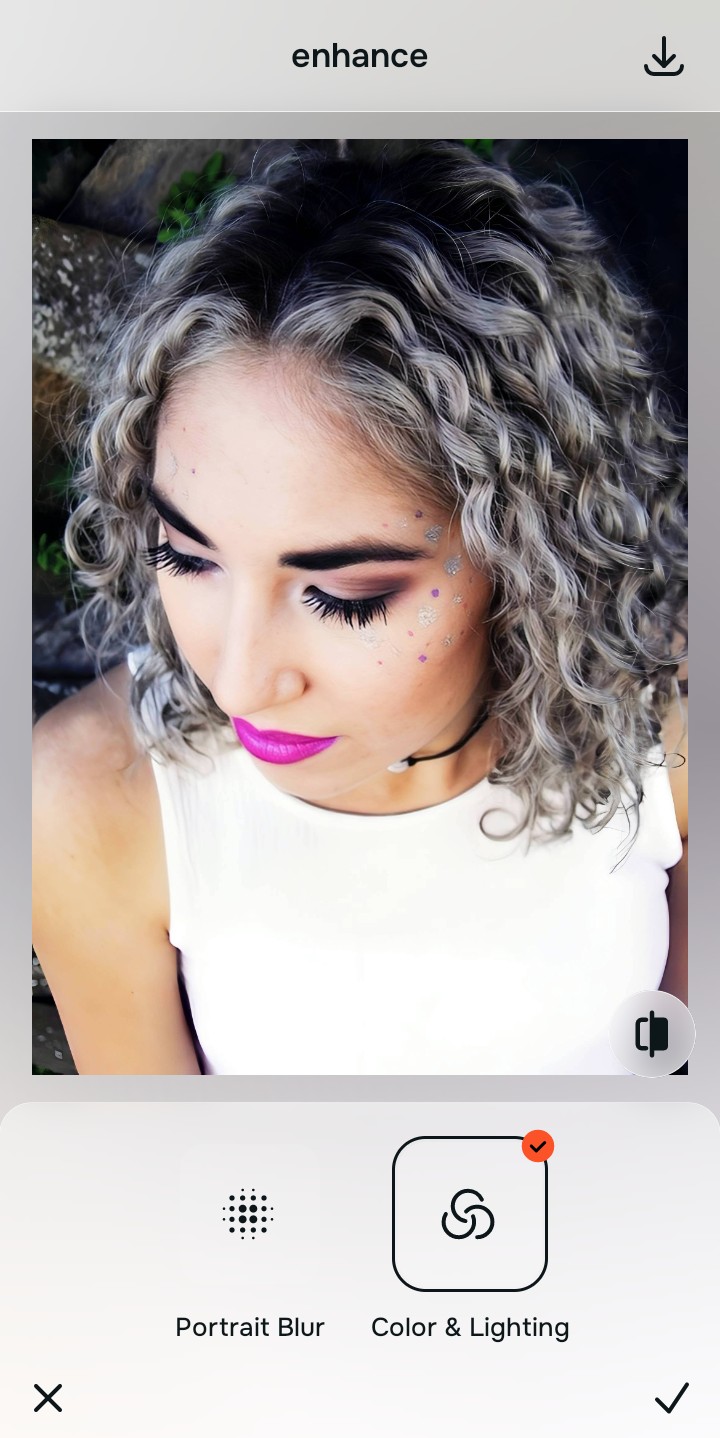
Tap Looks and select Magnetic to restore vitality
Whenever you lift deep shadows, the recovered skin naturally loses its color saturation, leaving you looking a bit ashy or pale. Tap Looks → Magnetic in Citrus. Select your preferred value from Level 1–5. This biometrically injects healthy, golden-hour vitality back into the skin so you actually look like you're at the beach.

Export your high-resolution, uncompressed portrait
Citrus provides clean, unwatermarked HD exports completely for free, reversing the camera's auto-exposure errors effortlessly so your selfie looks perfectly balanced and beautifully lit.

How did the backlight ruin your selfie?
Identify your primary optical hurdle to select the exact automated pathway in Citrus.
Aligning Your Edits with the Citrus Taxonomy
Instead of guessing which manual slider will rescue your face without ruining the sky, Citrus categorizes enhancement into three distinct, mathematically safe pathways:
“Portrait enhancement should never require you to sacrifice the sky to save your face. It must mathematically isolate the 3D depth so you look naturally radiant against a perfect background—effortlessly and instantly.”
Why Optical Isolation Beats Generic Shadow Sliders
There is a massive structural difference between authentic optical depth mapping and dragging a "Shadows" slider in a basic photo editor. When you lift the shadows on a backlit photo, standard editors blindly brighten every single dark pixel in the image. This introduces massive amounts of digital grain, destroys the natural contrast of your facial features, and washes out the entire photo into a flat, hazy gray mess.
Citrus is built specifically to prevent this. By constraining adjustments to mathematically calibrated Level 1–5 settings across Enhance, Looks, and Face, it calculates the 3D depth of the scene *before* adjusting exposure. It cleanly lifts the luminance of the foreground subject independently from the background sky. You get a clean, perfectly balanced photo in one tap without the deep-fried noise.