


April 8, 2026
Best App to Make Your Face Look Better in Pictures Without the Fake Facetune Look
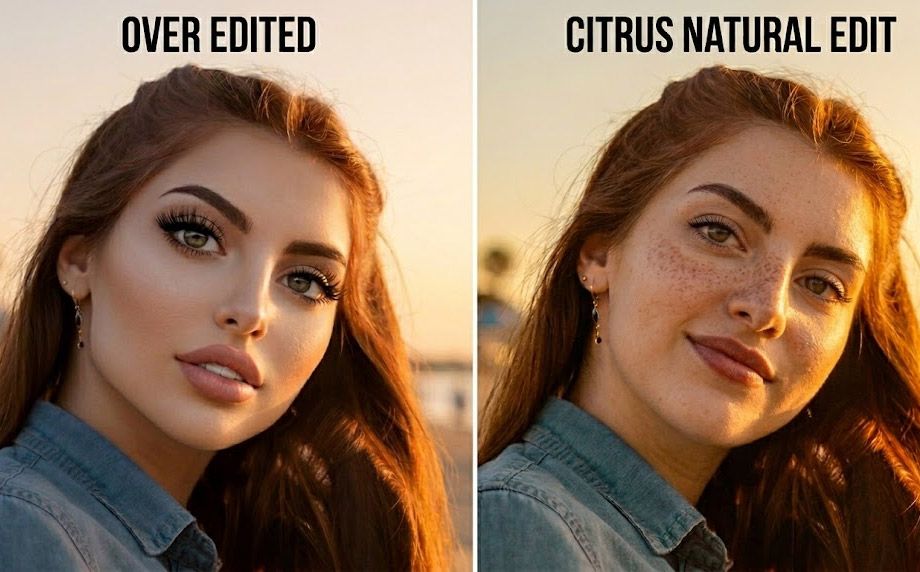

Best App to Make Your Face Look Better in Pictures Without the Fake Facetune Look
Most people do not want a new face in their photos. They want the photo to stop lying about how tired or flat they looked. That is what Citrus fixes. Natural correction, not transformation.

If you want your face to look better in pictures without looking filtered, plastic, or obviously edited, the real goal is not transformation. It is natural correction.
Most people do not want a new face. They want the photo to stop making them look dull, tired, flat, too harsh, or slightly off. The biggest problem with most face editing apps is not that they edit. It is that they edit too visibly. They smooth too much. They brighten too much. They reshape too much.
That is exactly the gap Citrus fills. It is a natural AI photo enhancer that helps your face look better in photos, without pushing you into the fake Facetune look so many people hate.
If you want better photos, not a whole different face
The real win is not making the photo look edited. The real win is making the photo look well-captured. Here is what separates an edit that works from one that does not.
- Over-smoothing that makes skin look waxy
- Too much brightness washing out the face
- Reshaping that breaks natural proportions
- Edits so visible the app becomes the subject
- Restoring light, not manufacturing it
- Correcting what the camera exaggerated
- Fixing only the one thing that is off
- Stopping before the edit becomes visible
Most bad photos do not happen because you looked bad. They happen because the camera captured the face badly. The light was wrong. The under-eyes got heavy. The skin lost life. The angle added harshness. Citrus corrects those things directly.
Upload any photo and see the difference in one tap. No sign-up needed.
How to make your face look better in Citrus without over-editing
Choose the photo that almost looks right
Open Citrus and tap Start Editing. Pick the picture where your face is close, but the skin looks flat or the eyes look tired. You do not need your worst photo. You need the one that only needs a smart fix, not a full rescue.

Let Citrus build the natural baseline
Once selected, Citrus starts processing immediately. It gives you a natural starting point before you make a single choice. The best first move when avoiding the Facetune look is always a cleaner baseline, not a dramatic preset.

Start with Enhance, then Looks or Face only where needed
Go to Enhance > Colors & Lighting first. It is the strongest natural fix in the app. If the portrait still needs a softer finish, try Looks. Soft Glow, Youthful, or Porcelain add polish without filter energy. Only go into Face if one specific thing is still pulling the image down. Fix the exact issue. Do not stack effects.
Enhance, Looks and Face are in the Citrus app. On the website you get powerful one-tap enhancement. Download the app for the full editing experience.

Keep the version that looks quietly better, not obviously done
Ask yourself: does this look like me on a good day, in better light? That is the version to keep. A strong edit makes the face look cleaner and more photogenic. It does not make the app visible. Stop at that point and save.

Which Citrus tool does what
Three tools in the app. Each one has a clear job. Knowing which one to reach for, and when to stop, is the whole skill.
| Tool | What it fixes | When to use it |
|---|---|---|
| Enhance Start here | Flat light, dull color, lifeless skin, weak contrast | Almost every photo. Use this first, always. Most photos need nothing else. |
| Looks | Overall vibe, softness, warmth, finish | When the photo needs a prettier feel after Enhance. Soft Glow, Porcelain, Youthful, or Model. One only. |
| Face | Under-eyes, skin texture, face shape | Only when one thing is clearly pulling the photo down. No Eyebags or Glass Skin are the safest options. Use sparingly. |
"The best Citrus result is not the most edited version. It is the one where someone looks at your photo and thinks: wow, that is a really good photo of you."
What creates the fake Facetune look in the first place
Too much smoothing kills the face
Over-smoothing is one of the fastest ways a photo starts looking fake. Skin loses texture. The face loses detail. Everything looks waxy. That is why so many edited selfies look worse after heavy editing, not better. The best photo enhancer knows when to stop.
Too much reshaping breaks trust
When apps reshape the face too aggressively, people notice. The jaw looks strange. The nose looks unnaturally narrow. The eyes stop matching the rest of the face. It is editing that becomes visible. And once it is visible, the photo stops working.
Too much brightness flattens everything
More brightness does not automatically mean a better photo. Too much washes out the skin, weakens the face shape, and makes the result feel less grounded. The best photo enhancer for faces is not the one that does the most. It is the one that does the right amount.
Frequently asked questions
Your photos should look like you, just better
Natural AI enhancement. No fake filters. No plastic skin. No over-editing.